
Last updated: October 2026
Quick answer: BMW Transport Mode is a factory energy-saving mode that restricts some systems, such as climate control, interior lighting and infotainment, to protect the battery during shipping. On F- and G-Series BMWs the control units store it, so disconnecting the battery, driving or clearing fault codes does not end it. A diagnostic command switches the car back to normal mode.
You can read the mode for free and switch it from your phone.
What Is BMW Transport Mode and What Are the Symptoms?
Transport Mode is one of BMW's energy-saving modes. Cars leave the factory in it so they use as little power as possible on ships, trains and trucks, and the dealer switches it off before handover. While it is active, several control units, from the climate control to the instrument cluster, switch to energy-saving operation and restrict some of their functions.
Most owners do not search for "Transport Mode" at first. They notice that several unrelated systems stopped working at the same time:
- Instrument cluster: a Transport Mode notice appears, and on some models the battery charge level is shown when you unlock the car or press the Start/Stop button.
- Climate control: the blower or the air conditioning may be restricted.
- Interior lights and roof console: the dome lights, roof-console functions and the sunroof may not respond.
- Infotainment: radio and iDrive functions may be limited.
- Fault memory: several control units report "Energy saving mode active" in the same scan. This is the most reliable sign (see the table below).
Some owners also report a shorter key fob range or a power tailgate that does not respond. Exactly which functions are restricted depends on the model, the equipment and the software level.
Why Is My BMW in Transport Mode?
- It was never switched off. New, imported or long-stored cars sometimes reach their owner with the mode still active.
- A software update or coding session was interrupted. Programming tools switch the car into Flash mode, another energy-saving mode, during an update. If the session is interrupted, the car can stay in Flash mode, and you get the same restricted functions after coding or flashing.
- Someone switched it on for shipping or storage and forgot to switch it off.
- After a battery change? A flat or replaced battery is not a documented cause of Transport Mode. Low voltage does, however, cause very similar symptoms and fault codes, so read the actual mode before you replace any parts.
Diagnosis and Technical Facts: Why Manual Methods Fail
On F- and G-Series BMWs, Transport Mode is not a fault code. It is an operating mode that the control units store in memory that survives a battery disconnect. The body control unit is the reference, and which one your car has depends on the platform:
- F01/F10 family (such as F01, F10, F11): CAS4 (Car Access System).
- F20/F30 family (F20, F21, F22, F30, F31, F32, F36, F80, F82): FEM (Front Electronic Module).
- F15, F48 and G-Series (such as G20, G30, G05): BDC (Body Domain Controller).
That is why the usual tricks do not work:
- Disconnecting the battery does not reset it. The control units start up again in the same mode, often with extra low-voltage faults.
- Driving does not end it. There is no drive cycle that switches it off. BMW's own procedure uses a diagnostic command.
- Clearing fault codes does not end it. The "Energy saving mode active" faults are a consequence of the mode. Clear them and they come back, because the mode is still on.
- Generic OBD2 code readers cannot see it. They read emission-related engine data and do not talk to BMW body control units.
- Coding is not the same thing. Coding changes configuration values. Transport Mode is switched by a diagnostic routine (UDS RoutineControl, service
0x31) sent to the control units. - Laptop factory software is heavy. Tens of gigabytes of Windows software, an Ethernet network setup, a guided test plan and an external power supply, all for one setting.
How to Confirm It: The Fault Codes BMW Control Units Store
When an energy-saving mode is active, each affected control unit stores its own "Energy saving mode active" fault (German: Energiesparmode aktiv). The codes below come from BMW's control unit data. If you see several of them in one scan, the car is in Transport, Production or Flash mode; it is not suffering from a series of separate faults.
| Control unit | Fault code | Fault text |
|---|---|---|
| Body control unit (CAS4, FEM, BDC) | 024000 | Energy saving mode active |
| Engine control unit (petrol, such as N55, B48, B58) | 021200 | Energy saving mode active |
| Climate control (IHKA) | 027800 | Energy saving mode active |
| Roof function centre, interior light (FZD) | 025600 | Energy saving mode active |
| Instrument cluster (KOMBI) | 026000 | Energy saving mode active |
| Head unit (NBT, Entry, MGU) | 026300 | Energy saving mode active |
| iDrive controller (ZBE) | 026700 | Energy saving mode active |
| Electric power steering (EPS) | 023000 | Energy saving mode active |
Some engine control units use 021300 instead. Be careful with code lists found online: E71470 on the climate control, for example, is a communication fault, not an energy-saving fault.
The Smart Software Solution: DiagBimmer App
The DiagBimmer App reads and switches BMW's energy-saving mode from your phone, without a laptop or a dealer visit.
- Shows the real mode: the "Transport Mode" card reads the body control unit and shows "Normal", "Transport", "Production" or "Flash".
- Turns it off: "Turn Transport Mode off" returns the car to normal mode from Transport, Production or Flash mode, including a car left in Flash mode by an interrupted update.
- Turns it on: "Turn Transport Mode on" puts the car into Transport Mode for shipping or storage, after a confirmation.
- Checks the result: after every command the app reads the mode back and shows what the car reports, not just "command sent".
- Finds the right control unit for your car (CAS4, FEM or BDC) automatically.
Pricing: reading the status is free. Turning Transport Mode off or on is part of DiagBimmer Premium, a one-time purchase with no subscription. You can try the whole function on the built-in demo vehicles first, without a car or an adapter.
Step-by-Step Guide: How to Turn BMW Transport Mode Off (or On)
Before you start: switch the ignition on with the engine off. If the battery has been flat, charge it first or connect a battery charger; a weak battery causes faults of its own.
- Download the App: Get the DiagBimmer App from the Google Play Store.
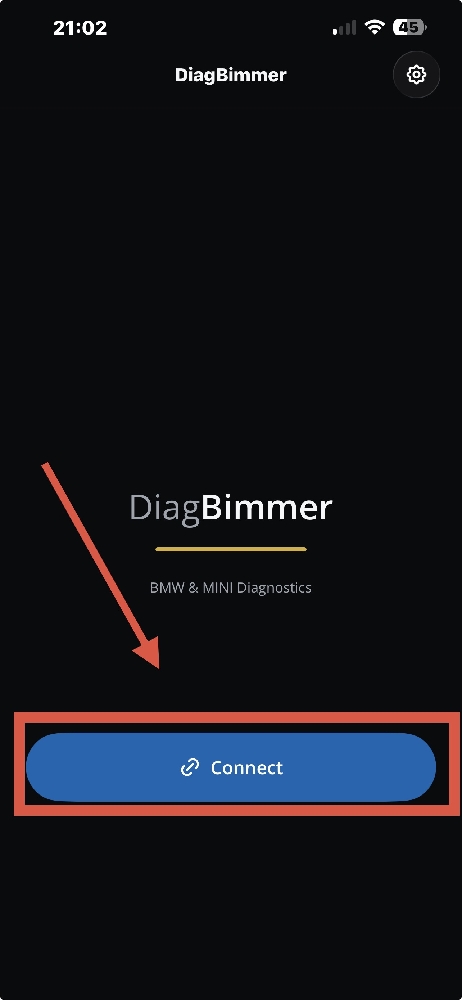
- Connect to Your BMW: Plug your OBD2 adapter into your car (an ENET cable is strongly recommended for the fastest and most reliable connection; high-quality BLE / Wi-Fi ELM327, vLinker, or OBDLink can also be used). Turn the ignition ON (Engine OFF). Open the DiagBimmer app, tap the "Connect" button, and once your VIN appears, tap "Open Dashboard".
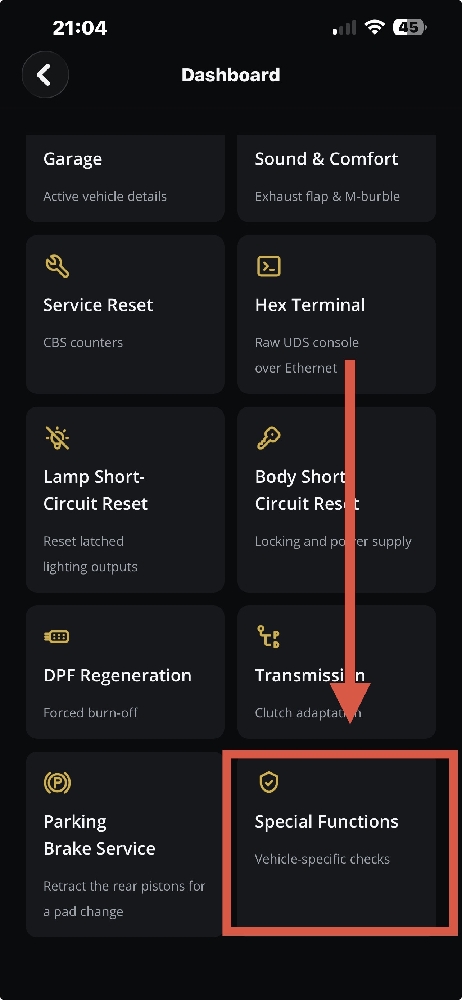
- Open Special Functions: On the "Dashboard", scroll down and tap the "Special Functions" tile.
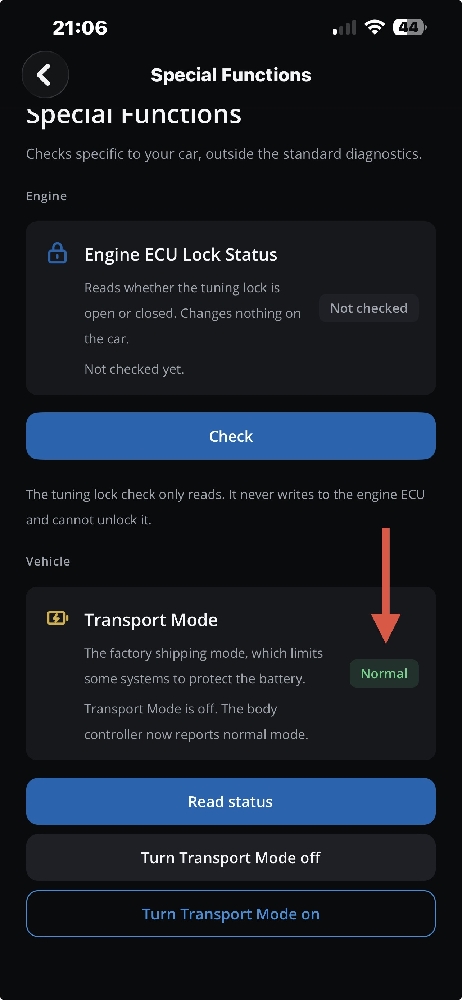
- Read the current mode: Under "Vehicle", find the "Transport Mode" card and tap "Read status" (free). The badge shows the mode the body control unit reports. If it shows "Transport", the card says: "Transport Mode is on: some systems, such as the infotainment and climate control, may be restricted to protect the battery." If it shows "Flash" or "Production", the car is in another energy-saving mode, and the next step returns it to normal as well.
- Turn Transport Mode off: Tap "Turn Transport Mode off". The app sends the command and reads the mode back. When the badge shows "Normal" and the card says "Transport Mode is off. The body controller now reports normal mode.", the car is back in normal mode.
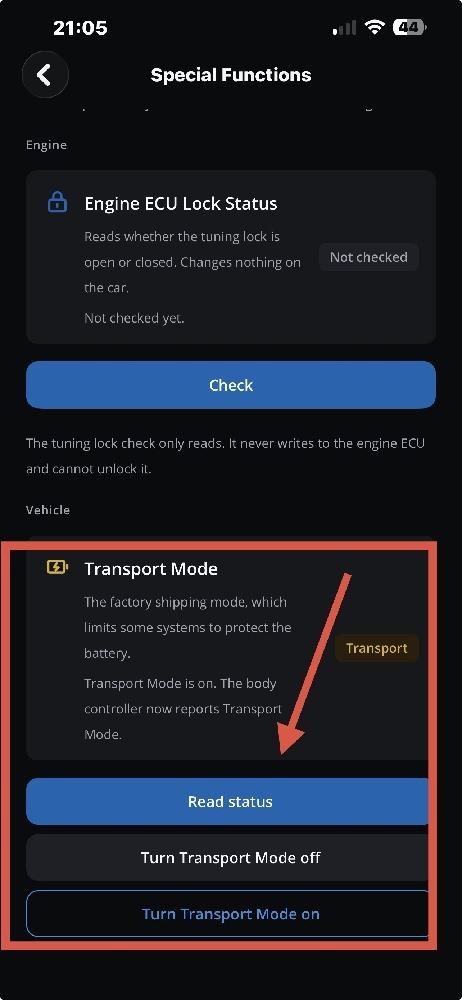
- Optional, for shipping or storage: Tap "Turn Transport Mode on" and confirm with "Turn on". The badge changes to "Transport" and the card says "Transport Mode is on. The body controller now reports Transport Mode." Turn it off again before you use the car normally.
Verification and Important Warnings
How to know it worked:
- The app shows "Normal". Tap "Read status" again later, for example after your next drive, to confirm that the mode has stayed normal.
- The car behaves normally. The Transport Mode notice is gone from the instrument cluster, and the climate control, interior lights and infotainment work as usual. If a notice stays on, switch the ignition off, lock the car, let it sleep for a few minutes and check again.
- Clean up the fault memory. Once the mode is normal, run a fault scan and clear the stored "Energy saving mode active" faults. They are history now.
If the app shows a different message:
- "The command was sent, but the car does not report the requested mode yet." Read the status again after a few seconds.
- "The car refused the command." Switch the ignition on with the engine off and try again.
- "Some modules took the command but the body controller refused it": the car may be only partly switched. Switch the ignition on with the engine off and try again.
Important warnings:
- Transport Mode is not battery registration. Switching Transport Mode off does not register a new battery, and registering a battery does not switch Transport Mode off. After a battery change, do both if needed.
- If the symptoms come back while the app shows "Normal", Transport Mode is not the cause. Check the battery charge, the charging system and the battery sensor (IBS) on the negative terminal, and scan for low-voltage faults.
- Do not use Transport Mode for daily driving. It is designed for shipping and storage. Switch it off before you use the car normally.
- Long-term storage: Transport Mode lowers the car's power use, but it does not charge the battery. For storage of several weeks, a battery maintainer is still the safest option.
Frequently Asked Questions
Can I drive my BMW in Transport Mode?
The car can be started and moved, which is how it gets onto ships and trucks, but some comfort systems may be restricted. It is not meant for everyday driving, so switch it off first.
Does disconnecting the battery reset BMW Transport Mode?
No. The control units store the mode in memory that survives a battery disconnect. They start up again in Transport Mode, often with extra low-voltage faults.
Is Transport Mode the same as Energy Saving Mode?
Transport Mode is one of BMW's energy-saving modes; Production mode and Flash mode are the others. In each of them, control units store "Energy saving mode active". DiagBimmer shows which mode your car is in.
Why is my BMW in an energy-saving mode after coding or a software update?
Programming tools switch the car into Flash mode during an update. If the session is interrupted, the car can stay in Flash mode. "Turn Transport Mode off" in DiagBimmer returns it to normal mode.
Does a new battery or battery registration turn off Transport Mode?
No. Battery registration tells the car about the new battery. Transport Mode is a separate setting and has to be switched off separately.
Do I need a laptop or a dealer visit?
No. You need the DiagBimmer app and an OBD adapter (an ENET cable or a compatible OBD2 adapter). Reading the status is free; turning Transport Mode off or on is part of the one-time Premium purchase.
DiagBimmer is a one-time purchase (no subscription) that also offers Battery Registration, DPF Regeneration, Lamp Short-Circuit Reset and Service Reset.
DiagBimmer is an independent app and is not affiliated with BMW AG. BMW and model names are used only to identify compatible vehicles.