
Last updated: November 2026
Quick answer: Active Sound Design (ASD) is the synthesised engine sound a BMW plays through its cabin speakers. It does not change how the car sounds outside. The cleanest way to turn it off is through the OBD port, in software: no fuse to pull, no trim to remove, and you can switch it back on at any time. With the DiagBimmer app on an iPhone or Android phone it is a few taps: Sound & Comfort → Turn ASD off.


What Is BMW Active Sound Design?
Many F-series and G-series BMWs play an extra engine note through the audio system. BMW calls it Active Sound Design. The sound follows what the engine is doing and comes out of the same speakers as your music, so the engine sounds fuller inside the cabin than it really is.
ASD only feeds the cabin speakers. The sound outside the car comes from the engine and the exhaust, and on cars that have one, from the exhaust flap. Turning ASD off makes the cabin quieter and more natural; it does not make the car louder or quieter for anyone outside. If you want a louder exhaust, that is the exhaust flap, a different system. We cover it in how to keep the BMW exhaust flap open.
Owners usually turn ASD off because they prefer the car's real sound, or because the artificial note becomes much more noticeable after an amplifier or speaker upgrade. With ASD off, road and tyre noise can stand out a little more, because the artificial sound no longer covers it.
Every Way to Turn Off BMW ASD, Compared
There are six common ways to get rid of the fake engine sound. They differ in how complete, how reversible and how much work they are:
| Method | Turns ASD fully off? | Easy to undo? | Downsides |
|---|---|---|---|
| Drive mode, sound button or iDrive engine-sound setting | Usually not: it lowers the sound, and the menu option is missing on some cars | Yes | Not a permanent off switch |
| Pulling the ASD fuse | Yes, if you find the right fuse | Yes, refit the fuse | The fuse position differs from model to model; owners report that the car stores a fault for it; where ASD runs inside the audio amplifier, that fuse can also feed the rest of the sound system |
| Unplugging the ASD unit | Yes | Yes, but the trim comes off again | Panels have to be removed; only possible on cars that have a separate ASD unit |
| Bypass harness | Yes, on compatible cars | Yes, remove the harness | An extra part fitted behind the trim; not made for every BMW audio system |
| Computer-based coding | Yes, on supported cars | Yes, if you saved the original setting | Needs a laptop, a cable and know-how; some owners report redoing it after a software update |
| Phone app through the OBD port (DiagBimmer) | Yes, on supported cars | Yes, one button | Needs an OBD adapter; support depends on the audio module in your car (see below) |
Software methods are the tidiest because they switch off the ASD function itself and leave the wiring alone. The difference between them is the tools you need. The DiagBimmer app does it from your phone, with a small OBD adapter, and gives you a Turn ASD on button for the way back.
Which BMWs Have ASD, and Will It Work on Yours?
Online lists of "BMWs with ASD" disagree with each other, and for good reason: two cars of the same model can be built differently. BMW also puts ASD in different places. On some cars it is a separate unit, on others it runs inside the audio amplifier, and on many G-series cars it is built into the audio module. Each one is switched in its own way.
DiagBimmer does not guess from the model name. When it checks ASD, it first asks the audio module what it is, and only sends the ASD command the manufacturer's data defines for that exact module:
| Where your BMW makes the ASD sound | What DiagBimmer does |
|---|---|
| A separate ASD unit (for example the F82 M4) | Shows Turn ASD off and Turn ASD on |
| The audio amplifier (on some cars) | Shows Turn ASD off and Turn ASD on |
| The audio module of many G-series cars | Changes nothing by itself: you press Check ASD and confirm, then the buttons appear |
| An audio unit that also plays the pedestrian warning sound of an electrified BMW | Sends the command for ASD only; the warning sound is a separate function and is never the target |
| An audio module the app does not recognise | Sends nothing and says that ASD is not supported on this vehicle |
If your car has no ASD at all, the Active Sound Design section simply does not appear.
Where it has been tried so far: ASD off and on has been tried on an F-series M4 (F82). It is not yet confirmed on G-series cars. We list a model here only after it has been tried on a real car.
Before you buy: checking and switching ASD on your own car is part of DiagBimmer Premium. To see every screen first, open the app without an adapter and pick a demo vehicle: the demo runs inside the app, Premium features included, and nothing is sent to any car.
How to Turn Off BMW ASD with DiagBimmer, Step by Step
You need an iPhone or Android phone, a supported OBD adapter and a few minutes. The screenshots show the BMW 320d (F30) demo vehicle built into the app.
- Get the app: download the DiagBimmer app for iPhone or Android.
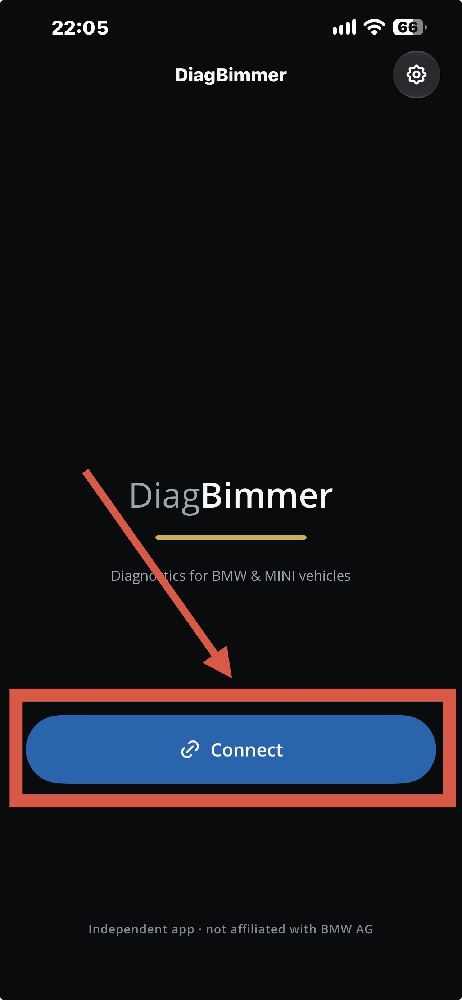
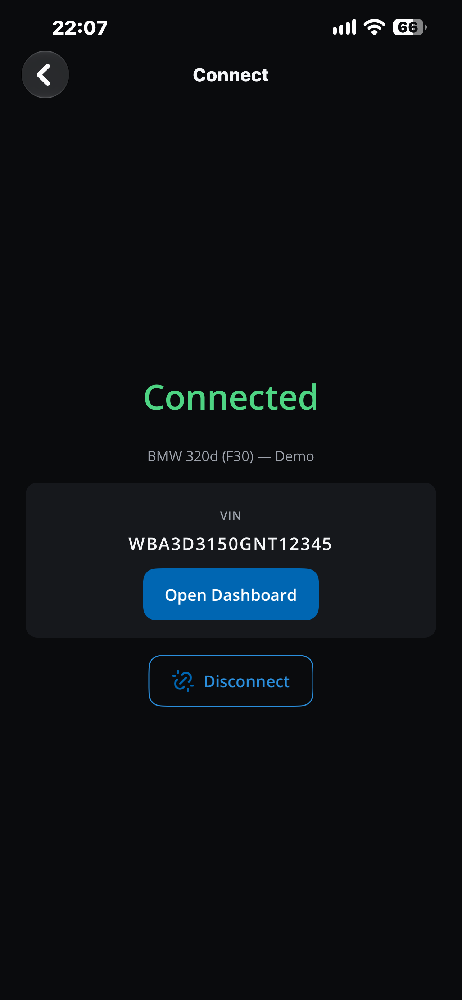
- Connect to your BMW: plug the adapter into the OBD port and switch the ignition on. Open DiagBimmer and tap Connect. When the screen shows Connected and your car's VIN, tap Open Dashboard.
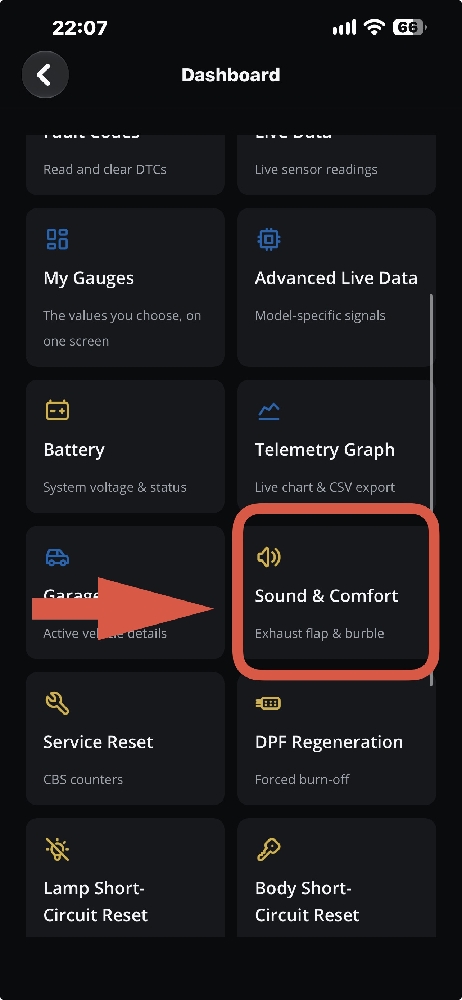
- Open Sound & Comfort: on the dashboard, tap the Sound & Comfort tile.
- Allow the detection (first time on your car): the first time you open this page for your car, the app asks for Feature detection. To find out whether and how your car's ASD can be switched, it briefly sets ASD to its factory state (on); if you have already chosen "off", that choice is applied again straight after. Tap Run full detection. On many G-series cars you see a Check ASD button instead; it asks you every time before it sends anything.
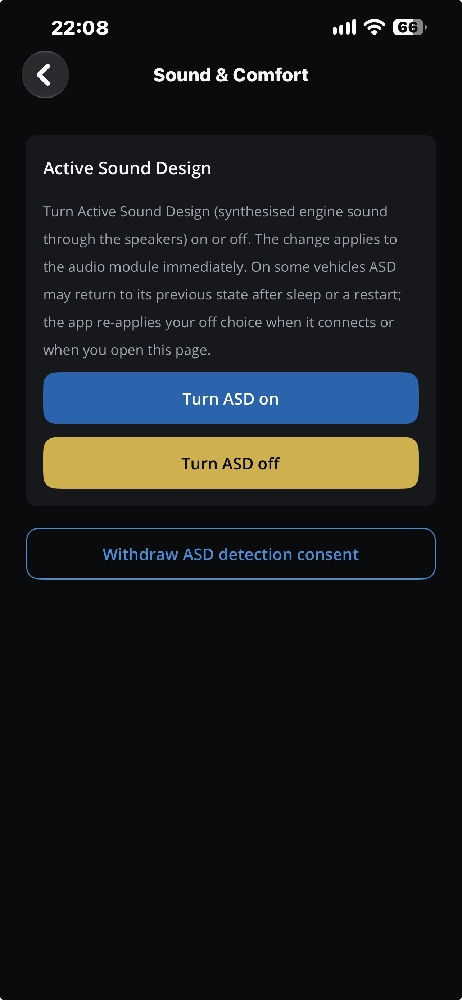
- Turn ASD off: in the Active Sound Design section, tap Turn ASD off.
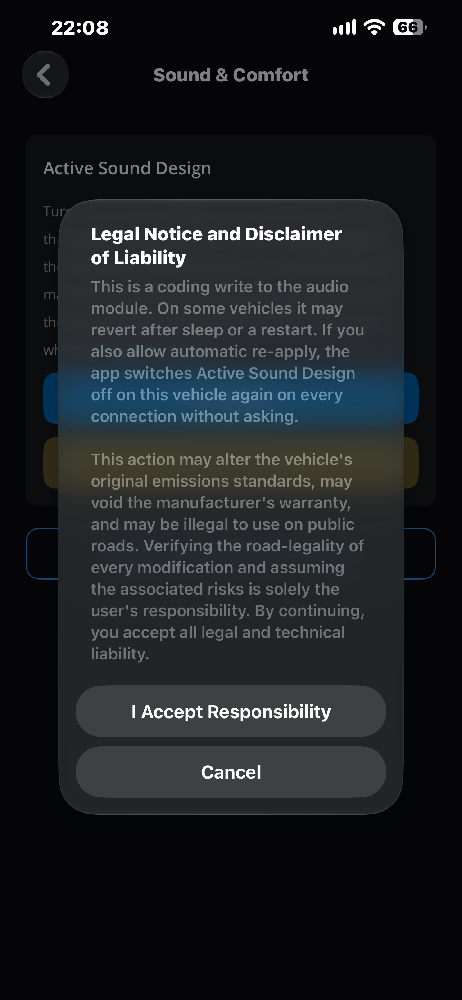
- Accept the legal notice: a Legal Notice and Disclaimer of Liability appears. Read it and tap I Accept Responsibility. Nothing is sent until you accept.
- Done: the app shows "Active Sound Design turned off." Drive the car the way you used to hear ASD most; the artificial engine note should be gone.
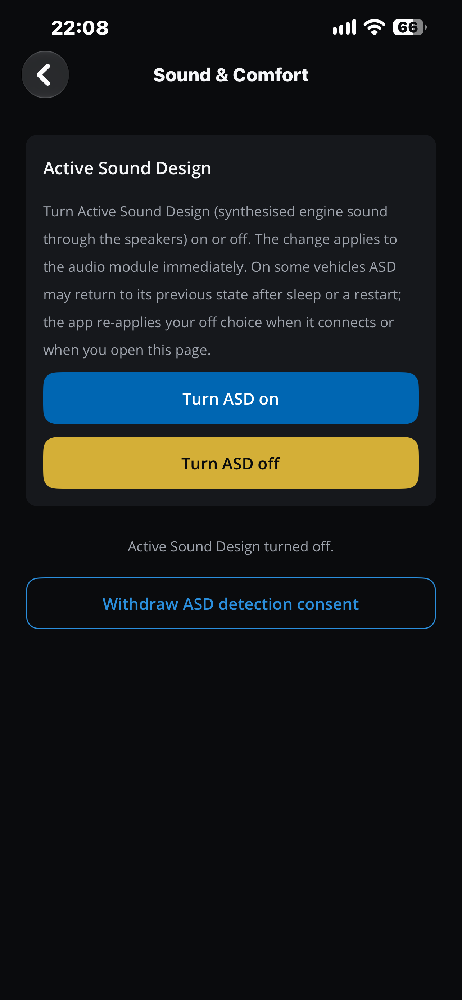
After the first time you turn ASD off, the app asks "Keep ASD off automatically?" The next section explains what that means.
Turning ASD Back On, and Keeping It Off
Back on: open Sound & Comfort and tap Turn ASD on. It asks for the same confirmation and changes ASD only. Your other settings are not touched, and there is no backup file to restore.
If ASD comes back: on some cars ASD can return to its previous state after the car sleeps or restarts, and some owners report having to switch it off again after a software update. If you answer Yes, re-apply automatically, the app switches ASD off again every time it connects to that car. If you choose No, I'll do it manually, it does so when you open Sound & Comfort. The app works only while it is connected; it does not run in the car on its own. On cars that show the Check ASD button, your "off" choice is applied again only when you press it.
Changed your mind about detection? The page has a Withdraw ASD detection consent button. It deletes the stored consent for that car and writes nothing to the vehicle.
BMW ASD: Frequently Asked Questions
Can I turn BMW ASD back on after turning it off?
Yes. In DiagBimmer, tap Turn ASD on on the Sound & Comfort page and confirm. With a fuse or an unplugged unit, you refit the part; with a bypass harness, you remove it.
Does turning off ASD void the BMW warranty?
We have not found a public BMW rule that addresses ASD specifically. Warranty decisions depend on the market and on the repair being claimed, so if your car is under warranty, ask your dealer. The app shows a legal notice before every change. Because ASD can be switched back on with one button, you can also restore it before a dealer visit.
Will ASD come back after a software update or a restart?
It can, depending on the car. The app's Keep ASD off automatically option re-applies your choice the next time it connects.
Will my exhaust sound different from outside?
No. ASD only plays through the speakers inside the car. The real exhaust note is unchanged.
Is pulling the ASD fuse a good idea?
It works on some cars, but the fuse is in a different place from model to model, owners report that the car stores a fault for it, and on cars where ASD runs inside the audio amplifier the same fuse can power more than ASD. A software switch avoids all three.
Do I need a laptop?
No. An iPhone or Android phone and an OBD adapter are enough. The adapter types each phone supports are listed below.
What about electric and hybrid BMWs?
Electrified cars play a legally required warning sound for pedestrians at low speed. DiagBimmer is built so that its ASD command never targets that sound. ASD switching on these cars is not yet confirmed on a real car either.
DiagBimmer is a one-time purchase (no subscription). The same Sound & Comfort page also controls the exhaust flap on cars that have one, and the burble on S55 engines. The full-vehicle fault scan and fault code clearing are free.
On iPhone, use a BLE or Wi-Fi OBD adapter (ELM327 v1.5+) or a Wi-Fi ENET adapter; Bluetooth Classic and USB adapters work only on Android.