
Last updated: October 2026
The Problem: Your BMW Does Not Know the Battery Is New
You have just fitted a new battery to your BMW. The car starts and everything seems fine — but the car itself does not know that the battery is new. BMW's battery power management keeps track of the battery's age and adjusts the charging to it. Until you register the new battery, the car keeps treating it like the old, worn one.
That is why every BMW battery replacement should be followed by a battery registration, and why so many owners search for bmw battery registration or how to register a new battery on a BMW: a parts shop can sell you the battery, but usually cannot register it.
Quick answer: registering the battery tells the car's engine control unit that a new battery has been fitted, so the charging is adjusted to a fresh battery again. You can do it yourself from your Android phone with an OBD adapter — ignition on, engine off.
What Happens If You Don't Register It?
The power management charges a battery according to its age: an old battery is charged harder to make up for the capacity it has lost. An unregistered new battery gets that same treatment. It can be overcharged and wear out sooner than it should.
Same type and capacity: registration is all you need. Different capacity (Ah) or a different type, for example AGM instead of a standard lead-acid battery: the battery data coded in the car must be changed as well. DiagBimmer registers the replacement; it does not change the coded battery type or capacity.
Which Cars Does This Apply To?
F-Series and G-Series petrol and diesel models, for example the 1 Series (F20), 3 Series (F30, G20), 4 Series (F32, G22), 5 Series (F10, G30) and the M models. The screenshots below show the BMW M3 (F80) demo vehicle built into the app.
The Old Way vs. the Phone Way
Battery registration used to mean a trip to the dealer, or a Windows laptop with an ENET cable and engineering software such as ISTA or Tool32. With a BMW battery registration app such as DiagBimmer, you can register a BMW battery from your Android phone.
Step-by-Step: How to Register a New BMW Battery with DiagBimmer
- Fit the new battery. Ideally the same type and capacity as the old one (see above).
- Install the app. Get DiagBimmer from the Google Play Store. You can try it on the built-in demo vehicles first — no adapter or car needed.
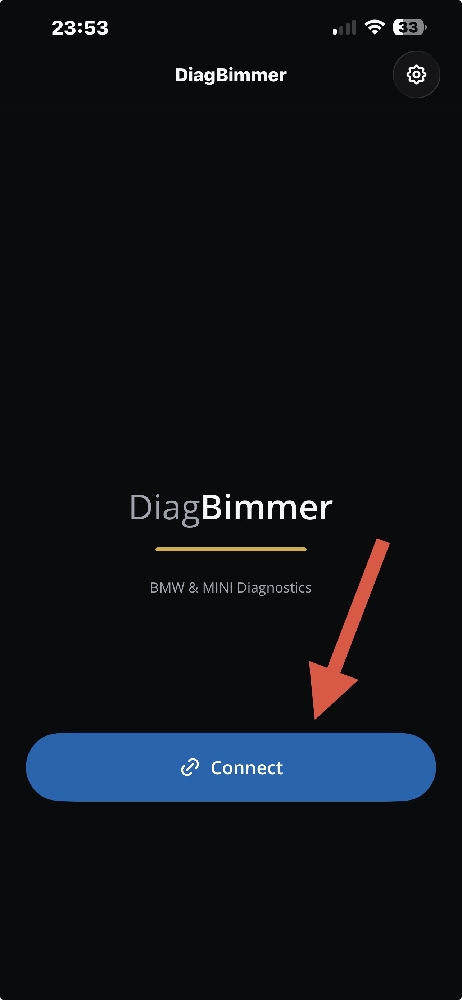
- Connect to your BMW. Plug your adapter into the OBD port, turn the ignition ON with the engine OFF and tap Connect. An ENET cable is the fastest option; ELM327 v1.5+ compatible BLE, Bluetooth, Wi-Fi and USB adapters also work.
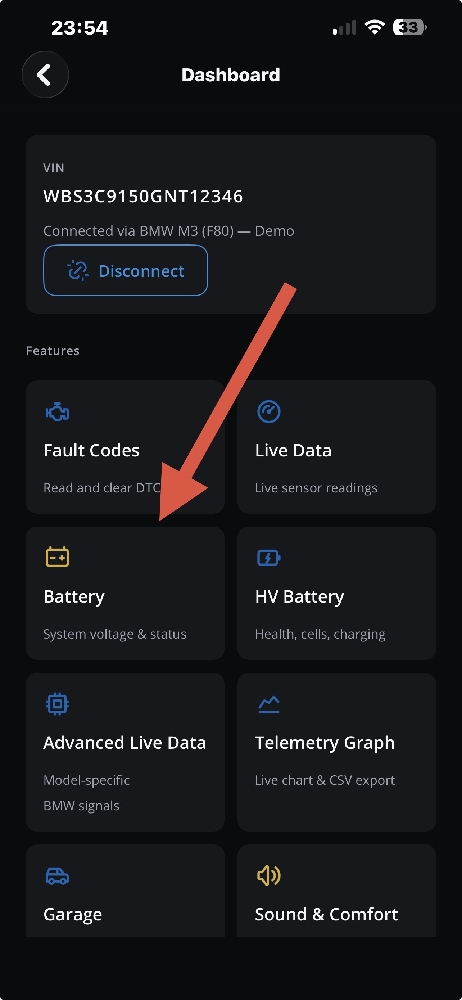
- Open the Dashboard and tap Battery. The page shows the system voltage and the charging status (free). From version 1.0.2 it also shows the car's own record of the last battery replacement in km when the car reports it (free).
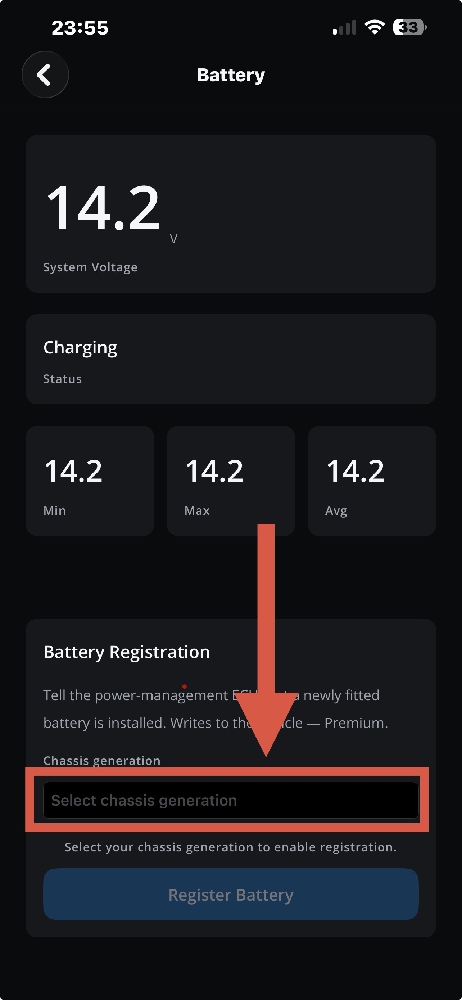
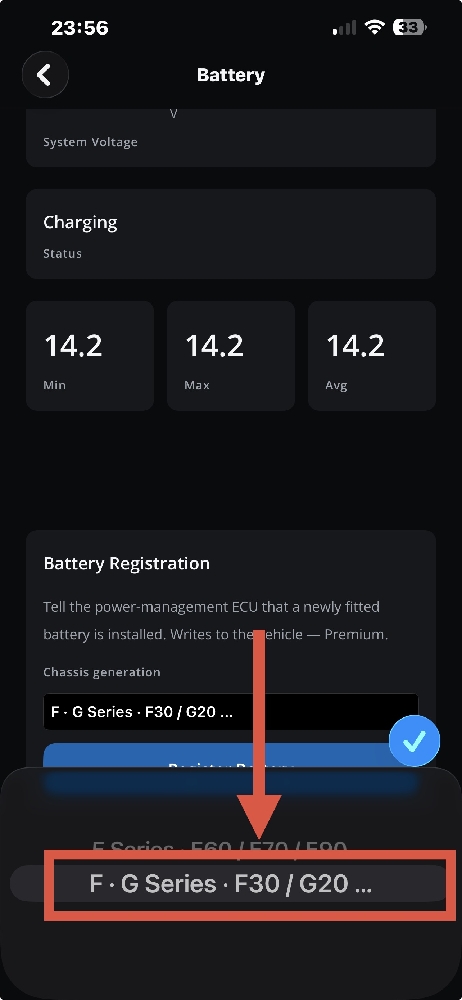
- Select your chassis generation under Battery Registration: F · G Series.
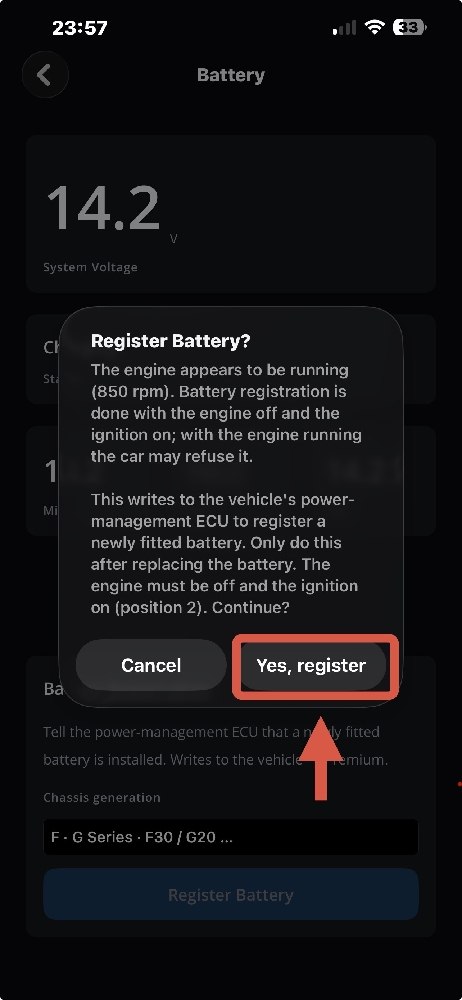
- Tap Register Battery and confirm with Yes, register. The engine must be off and the ignition on. With the engine running the car refuses the registration; from version 1.0.2 the app warns you in the confirmation. The demo car in the screenshot is idling, which is why the warning appears — on your car, stop the engine first.
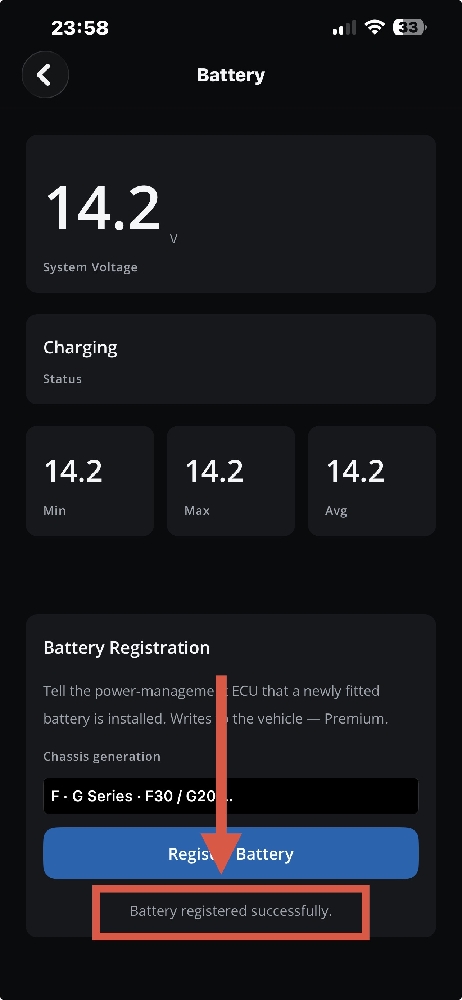
- Check the result. The app shows "Battery registered successfully." From version 1.0.2, when your car reports its replacement record, the app reads it again after registering; if it has changed, you see "Battery registration verified" with the new mileage, which should be close to your current odometer reading.
A light stopped working after the battery change? Check the lamp outputs: How to Reset BMW FEM & REM Short Circuit.
Frequently Asked Questions
Do I have to register a new battery on a BMW?
Yes. BMW expects a registration after every battery replacement, so that the power management adjusts the charging to the new battery.
Can I register the battery with the engine running?
No. The engine control unit only accepts the registration with the ignition on and the engine stopped. If the app says the vehicle conditions are not met, stop the engine, leave the ignition on and try again.
I fitted a bigger battery or an AGM battery. Is registration enough?
No. When the capacity or the battery type changes, the battery data coded in the car must be changed too. DiagBimmer registers the replacement but does not change the coded battery type or capacity.
How do I know the registration worked?
From version 1.0.2, DiagBimmer reads the car's own battery replacement record after registering. If the record has changed, the app says the registration is verified. If the car acknowledged the command but the record did not change, the app tells you that instead of claiming success.
Which adapter do I need?
An ENET cable or an ELM327 v1.5+ compatible BLE, Bluetooth, Wi-Fi or USB adapter. If your adapter cannot send the registration command, the app tells you.
Is it expensive?
Reading the system voltage and the last battery replacement record is free. The registration is part of DiagBimmer Premium, a one-time purchase with no subscription. You need an OBD adapter for your car, and you can try the app on demo vehicles before buying.
DiagBimmer is a one-time purchase (no subscription) that also offers Lamp Short-Circuit Reset, DPF Regeneration, EPB Service Mode and ZF 8HP Adaptation Resets. The full-vehicle fault scan and fault code clearing are free.